Installing the charger
For electricians and installers. The Enua Charge and Enua Charge E mount onto an Enua Wallmount that has already been installed and configured in the Enua Installer app.
Warning
Make sure the Wallmount is configured and there are no obstructions on or around it before mounting the charger. Do not attach a charging cable until the charging station is securely locked and showing a solid white light.
Prerequisites
- An installed and configured Enua Wallmount.
- No charging cable attached to the charger while mounting.
Mount the charger
- Remove any charging cable from the Charge / Charge E before you start.
- Hold the charger with both hands and press it onto the Wallmount in one movement, keeping it parallel to the Wallmount.
- Wait for the charger to lock and show a solid white light before attaching a charging cable.
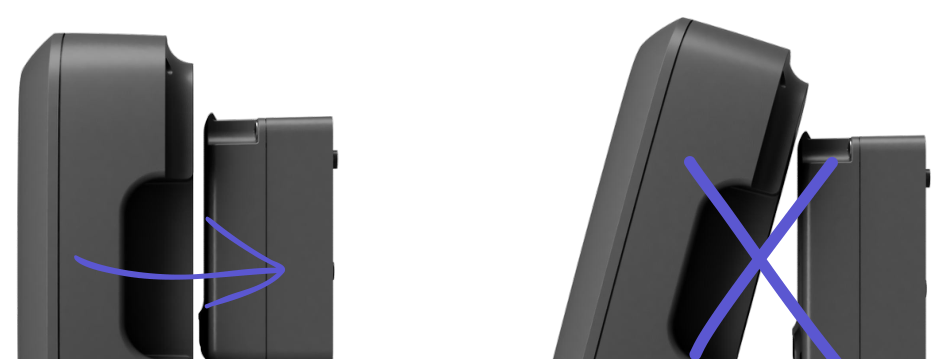
When it is connected to the Wallmount, the Charge (E) automatically downloads the correct configuration for that Wallmount. If the facility is controlled by a Charge Point Operator (CPO), the charging station automatically tries to connect to that CPO.
If the charger won't seat flush against the Wallmount or won't lock, the cause is usually an installation problem — see common mistakes when installing the Wallmount.
First use
- The customer controls the charging station through the Enua app (Apple App Store / Google Play) and registers their products using the registration code the installer provided.
- If a CPO operates the facility, the customer uses the CPO's app and systems instead.
- LED behaviour during mounting and use is explained in What the lights mean.
Removing the charger
Use the Enua app or enua.cloud: find the charging station, open the Controls tab and press Unlock under Wallmount lock, then wait for the white light to pulse. Then pull the charger straight toward you, wiggling gently side to side if needed.
If the charger won't release, an oversized or non-original grommet may be pushing it out and jamming the lock — see common mistakes when installing the Wallmount.
Technical specifications (Enua Charge / Charge E)
| Article number | 27001 |
| Weight | 2.20 kg |
| Protection | IP55 enclosure, IK10 impact, UL94-V0 flame resistance |
| Dimensions (mm) | H 273 × W 220 × D 100 |
| Maximum power | 22 kW @ 32 A 3-phase (TN); 12.7 kW @ 32 A 3-phase (IT); 7.4 kW @ 32 A 1-phase (IT/TN) |
| Installation voltage | 230 V AC ±10 % / 400 V AC ±10 %; TN, IT, TT |
| Protection devices | Integrated MRCD Type B (IEC 60947-2 Annex M), 30 mA AC + 6 mA DC; protection class I; overvoltage category III (4 kV); 32 A integrated fuse (IEC 60269-2) |
| Energy metering | 3-phase active energy meter, ±1 % accuracy |
| Communication | e-SIM (LTE-M / NB-IoT), Wi-Fi 2.4 GHz, RFID/NFC; OCPP 1.6j and 2.0.1 |
| Software | Automatic firmware updates |
Full manual: Enua Charge & Charge E user manual (PDF). The PDF is the authoritative source.